Product overview
FP Trax might be the perfect tracking solution.
FP Trax is cloud software that tracks parcels, assets and deliveries within your organization. Mobile scanning. Automatic notifications. No spreadsheets. All basic features are included in all plans. Plans from €290/month.
Basic features
All basic features are included in all plans. Plans are priced by the number of items
Receive, log and process every inbound delivery from the moment it arrives at your organisation.
Scan the carrier barcode or tracking number using a handheld scanner, tablet or mobile phone: FP Trax identifies the carrier automatically, matches the recipient from your contact directory and creates a full item record in seconds.
Mark items as damaged at the point of registration. Add photos, comments and up to six custom fields per item, such as purchase order numbers, project codes or department references.
Print a formatted internal label directly from the registration screen, with label layout and data fields fully configurable.
Deliveries can move through any number of status stages until the item reaches its final recipient, with each update logged and timestamped automatically.

FP Trax uses a configurable status and workflow system so every item follows the exact journey your operation requires.
Create as many statuses as you need: received, en route, at floor reception, out for delivery, delivered, failed delivery and any custom step specific to your organisation.
An item can change status and location any number of times between arrival and final delivery, making it possible to model complex journeys such as central receiving dock to parcel cage to floor reception to desk.
Each status change is timestamped, logged to the item record and can trigger an automatic notification to the recipient or sender.
Configure different workflows for different item types, such as parcels, registered mail and assets.
The mobile app includes an offline mode: operators can register, process and deliver items without a network connection and all data is synchronised automatically when the connection is restored.
All workflow configuration is handled from the settings panel by your own administrators, with no IT support or developer involvement required.

FP Trax sends automatic email notifications to recipients and senders the moment an item status changes.
An unlimited number of notification templates can be configured, one for each combination of item type and status, so a parcel at the point of receipt triggers a different message than the same parcel when it is placed in a locker or delivered to a desk.
Templates use dynamic data tags that pull live item information into the email body: tracking number, item type, sender, current location, carrier and collection instructions.
For locker deliveries, the notification includes the recipient's personal PIN or QR code for the locker door automatically.
Reminders are sent at configurable intervals when a parcel has not been collected within a set time. The sender name and reply address can be configured per template.

Capture photos of items at any point in their journey: on arrival to document condition, at each status update to confirm location and at handover to create proof of delivery. Photos are stored permanently against the item record alongside the full status history. Digital signatures are collected on screen when a recipient collects at reception or when a delivery is made to a desk or specific location, in both the web application and the mobile app. Every photo and signature is retained permanently and can be retrieved at any time by searching for the item. A signed PDF proof of delivery can be generated, downloaded or emailed directly from the item record in the web application, including item details, status history, signature image and any photos taken at delivery.

Search your complete item history across all locations using any combination of parameters: tracking number, recipient, sender, carrier, item type, status, damaged flag, date range or any custom reference field.
Free text search is available in both the web application and the mobile app for quick lookups without setting filters.
Each item record shows the full status history with timestamps and location data, alongside all photos, signatures and comments added throughout its journey.
Export search results to Excel or CSV in one click, with an extended export option that includes all custom fields and full status history.
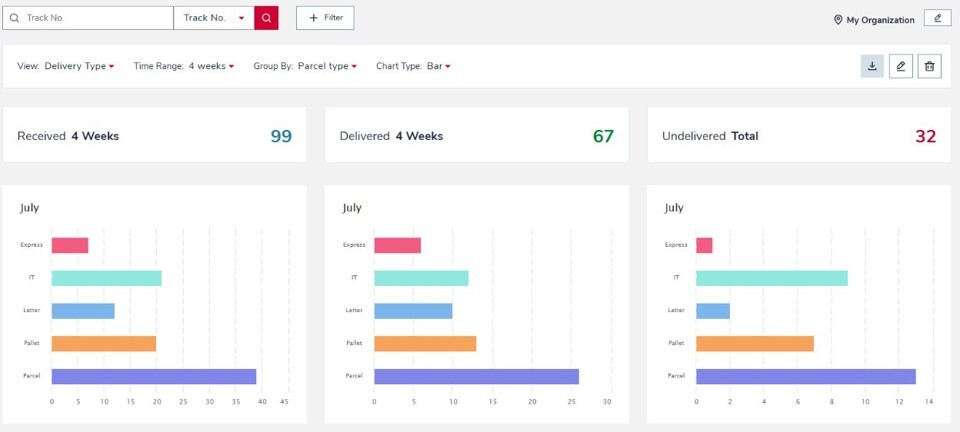
Dashboards in the web application show daily, weekly and monthly volumes for received, delivered and undelivered items at a glance. Clicking any dashboard tile opens the corresponding item list directly in the search view so exceptions and backlogs can be acted on without extra navigation.

FP Trax supports three methods for maintaining recipient and user data. Azure AD and Entra scheduled import runs automatically on a daily basis, pulling names, email addresses and location assignments directly from your Microsoft directory.
A scheduled HTTPS import provides the same capability for organisations using other identity providers. For organisations without a connected directory, recipients and users can be imported via Excel and maintained manually.
Each user is assigned a role that determines the functions they can access: administrator, transporter, customer, guest or a custom role.
Access levels control which locations and items each user can see, making it possible to restrict a mailroom operator to their own site while a central administrator sees all locations.
Single Sign On is supported via OpenID Connect and OAuth with Microsoft Azure AD or Entra, and can be combined with Microsoft MFA.

Define the full physical structure of your organisation in FP Trax: company, buildings, levels, rooms and reception points, to any depth required.
Each item is tracked by location at every status update, giving a complete audit trail of where an item was and when.
Intermediate locations such as parcel cages, goods receiving points and sorting areas can be used in delivery workflows, so an item moving from a central dock through a parcel cage to a floor reception before reaching its recipient is tracked at every step.
Location codes can be printed as barcodes or QR codes and scanned to update item location without manual input.
Organisations managing multiple sites can see all locations from a single FP Trax interface, with each site maintaining its own location hierarchy and access controls.

Administrators manage the full configuration of FP Trax from the settings panel without IT support or developer involvement.
Configurable elements include parcel types, carrier names, delivery statuses, notification templates, label formats, extra fields, mobile profiles and scheduled report templates.
Up to six custom extra fields can be added to item records, each defined as free text, checkbox or a dropdown with predefined values: these fields appear in registration, search and export and can be printed on labels.
The platform supports multiple languages and the interface language is configurable per user.
Data lifecycle settings control when item records move to the archive and when they are permanently deleted, in line with data retention policies. All configuration changes take effect immediately with no restart required.

Every recipient in FP Trax can log in to the employee portal to view their own current and historical deliveries in real time.
The portal shows item status, tracking number, sender, current location and any delivery instructions or collection notes.
Employees can update their own contact details and delivery preferences directly, without contacting the mailroom. The employee portal is available as a web application compatible with Chrome, Edge, Safari and Firefox, and as the FP Trax mobile app on iOS and Android.
If Azure AD or Entra integration is configured, employees log in using their existing organisational credentials.

Add-ons
Every optional module works with any plan. Activate what you need, when you need it.Multi Shipment bundles multiple parcels from the same sender or delivery run into a single unit that is processed and tracked together.
When creating a shipment, the operator scans all included items in one session: each parcel retains its individual tracking record, but the shipment becomes the unit for status updates and notifications.
When the shipment status is updated, all included items update simultaneously and a single email notification is sent to the recipient, covering all items in the bundle rather than one notification per parcel.
This reduces notification volume for recipients receiving multiple items from the same sender and cuts scanning time significantly for organisations processing bulk deliveries from suppliers, couriers or internal transfers.

Mobile Profiles give each mobile app user a tailored view of the items they are responsible for, removing the need to search or scroll through unrelated deliveries.
Profiles are configured by combining multiple filter parameters: route, location, carrier, sender, item type or any other available dimension.
Each profile appears as a tile on the mobile app home screen showing the current item count for that category, so a delivery operator can see at a glance how many items are waiting in each zone.
A user can have multiple profiles active simultaneously, each covering a different route or location.
Profiles are assigned centrally by an administrator, making it straightforward to set up distinct workflows for delivery drivers, porters and mailroom operators across large sites.

FP Trax connects to smart parcel lockers from partners including Flexity, Cleveron and RENZ, making lockers a delivery destination within the same workflow as desk delivery and reception collection.
When a parcel is registered to a locker compartment, the correct door opens automatically and FP Trax generates the recipient's access code.
The notification sent to the recipient includes their personal PIN, QR code or NFC code depending on the locker model. Collection is logged the moment the locker door is opened, with no additional scan or manual step required.
Locker capacity and availability are visible in the FP Trax dashboard. Lockers operate around the clock without reception staffing and support both indoor and outdoor installation.

Asset Tracking covers equipment with a circular lifecycle: loaned out to a named borrower, returned when the loan period ends and made available again.
Register assets with a barcode, QR code or RFID tag.
Each checkout is recorded against a named person with a return deadline.
FP Trax sends automatic reminders to the borrower when an item is overdue and gives the asset manager a live view of all loaned items, all overdue items and the current location of every asset.
Dashboard and reporting functions show loan history, asset status by location and overdue counts.
FP Trax can answer three operational questions at any moment: where is this asset right now, how many units of this type are currently in location X, and what was loaned to whom and when.

Letter Handling covers incoming mail and post that arrives without a barcode or tracking number.
When an untracked letter, envelope or piece of registered mail arrives, the operator selects the recipient from the contact directory and FP Trax sends an automatic email notification that mail is waiting at reception.
Multiple recipients can be notified in a single batch: the operator adds recipients one by one to a list and sends all notifications at once.
No label printing or barcode scan is required. The letter function sits within the mobile and web workflow alongside parcel handling, so mailroom staff manage all incoming items in one interface without switching applications.
Suitable for organisations that receive a regular mix of tracked parcels and untracked post.

Scheduled Reports generate and distribute item flow summaries automatically on a set schedule, without manual export or login.
Each report is configured with a name, filter criteria, send time and list of email recipients.
Filter options include item status, item type, carrier, location and time period: a facilities manager can receive a daily summary of undelivered items at their site while a central operations director receives a weekly overview across all locations.
Reports are sent at the configured time whether or not the recipients are logged into FP Trax. Multiple reports can be active simultaneously, each with a different schedule, filter set and recipient list.
Suitable for regular SLA monitoring, operations reviews and compliance record keeping.
FP Trax connects to your existing infrastructure through three integration points. Microsoft Azure AD and Entra integration handles recipient and user synchronisation automatically on a daily schedule and provides Single Sign On via OpenID Connect and OAuth, with support for Microsoft MFA.
The FP Trax REST API allows external systems to push data into FP Trax or query item records, enabling connections to ERP, HR, procurement or facilities management platforms.
Webhooks send real time event notifications to external systems when item statuses change, supporting event driven automation without polling.
All integrations are configured from the FP Trax settings panel. No custom build or third party middleware is required.
Add a second or subsequent parcel receiving location to an existing FP Trax plan.
Each additional site has its own location hierarchy, delivery workflows, notification templates and user access permissions, operating independently for daily use. At the same time, all sites share the same FP Trax instance, user directory, reporting layer and billing account.
A central administrator can search across all sites simultaneously and view consolidated dashboards without switching accounts. Suitable for organisations with multiple offices, campuses, hospitals or warehouses that need local autonomy with central visibility.
Additional sites are configured within the platform settings and are active the same day.
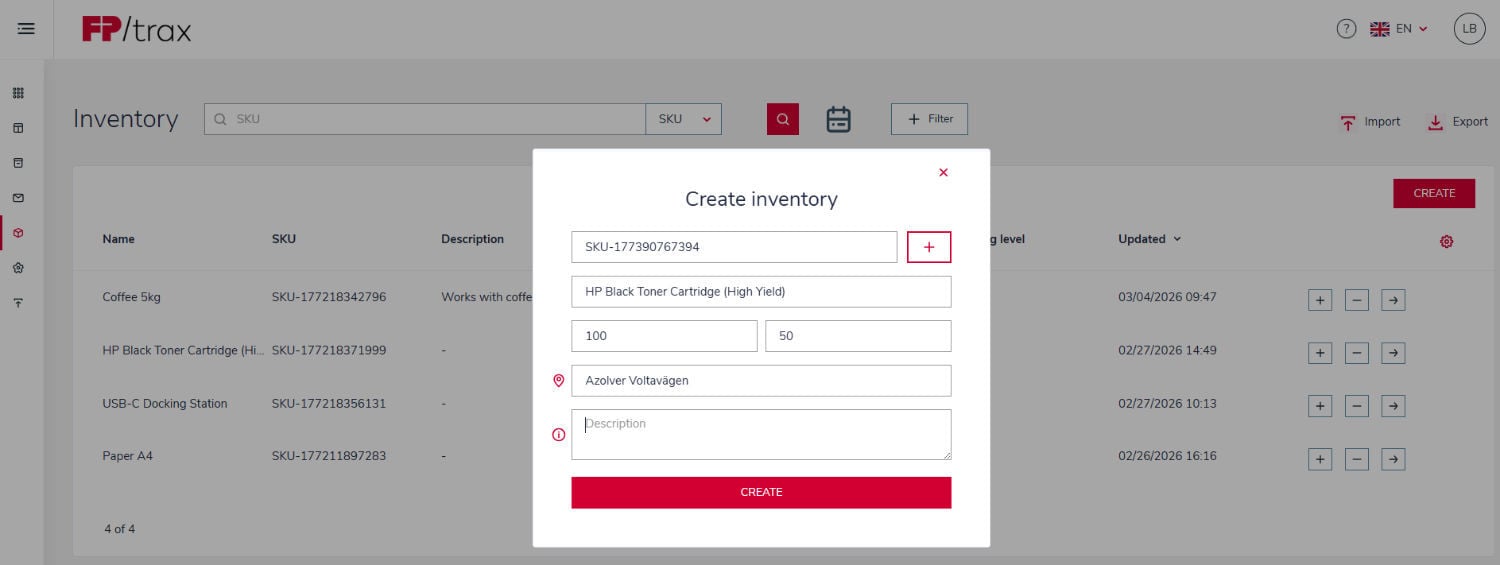
Inventory Management tracks stock quantities and logs every withdrawal by person and department. Assign each storage bin, shelf or item category a starting quantity: FP Trax updates the count in real time as stock moves in and out. When a staff member withdraws items, the transaction is recorded against their name and department, creating a full audit trail. Automatic alerts are sent when stock drops below a configurable reorder threshold. At any time, pull a consumption report by department to see exactly what each team withdrew and what it cost during a given period. Suitable for warehouses, university supply rooms, maintenance stores, healthcare facilities and any organisation managing replenishable stock that needs both quantity control and departmental cost attribution.
Flexible Dashboards allow users to create parcel reporting views that match their daily operations. Parcel data can be filtered by criteria such as recipient, parcel type, carrier, damaged goods and custom time periods, giving teams faster access to the insights that matter most. Individual dashboard views can be saved and reused for recurring analysis, daily workflows or management reporting, making reporting more efficient and consistent. Immediate KPI insights help teams track operational performance and support internal SLA compliance. Charts can also be downloaded as images, so operational insights can be easily shared in reports, updates or internal meetings.
How parcel tracking can be handled
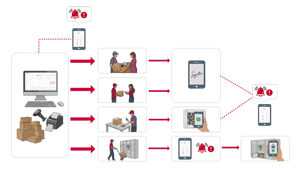
There are many different ways of how parcels and assets can be handled with FP Trax.
FP Trax works with every delivery model your mailroom uses. Each one logs the handover automatically.

SERVICE VIDEO
Showcase your awesome service with quality video content.
Lorem ipsum dolor sit amet, consetetur sadipscing elitr, sed diam nonumy
27K | 1.2MIO |
| Lorem ipsum dolor sit amet, consetetur sadipscing elitr, sed diam sit amet, consetetur elitr. | Lorem ipsum dolor sit amet, consetetur sadipscing elitr, sed diam sit amet, consetetur elitr. |