Parcel tracking
Track every parcel. From dock to desk.
300 parcels a day. Each one scanned, logged and sent with a notification before it leaves the receiving dock. The recipient is notified by email, SMS or Microsoft Teams. They collect at reception, have it delivered to their desk, pick it up from a smart locker or send a colleague. Whatever the method, FP Trax records who received it, when and where.
No spreadsheet. No phone calls. No lost parcels with no record attached.
Common issue: Every day, parcels arrive at reception and disappear into an informal system. A handwritten log. A shared spreadsheet updated by whoever has time. A pile sorted by memory. When a recipient calls to ask where their parcel is, someone starts searching. When something goes missing, there is no record to check. The process works until it does not, and when it fails the cost is time, trust and occasionally a significant package.
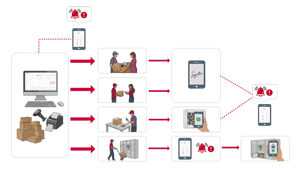
FP Trax identifies the recipient from your directory when it is scanned at arrival. A notification goes out automatically by email, SMS or Teams. The recipient collects, signs and FP Trax records who received it, when and at which location. 300 parcels a day? Still the same four steps. If anyone asks where a parcel went, the answer takes three seconds to find.
Track your assets - Try 30 days for free
Create account. → Download the mobile app. → Track of what is important to you.
Try 30 days, no credit card or strings attached.
How FP Trax parcel tracking works
The first three steps are the same for every parcel. Step four depends on how your team delivers. The four collection models are explained in the section below.Your team scans the carrier barcode on any device: mobile, tablet or desktop. FP Trax logs the parcel with timestamp, carrier name and tracking number. An optional photo attaches to the record at the same moment.
FP Trax looks up the recipient in your directory and sends a notification by email, SMS, Slack or Teams. The message includes sender, reference number and collection instructions. No phone calls needed.
However the parcel reaches the recipient, whether by pickup, desk delivery, locker or authorized colleague, FP Trax records the handover with name, time and location. Digital signature or locker log. Nothing on paper.
Every parcel, notification and handover is stored in FP Trax. Search by date, recipient, carrier or location. Export reports for compliance reviews, SLA tracking or internal audits in two clicks.

Many ways to deliver. One record.
FP Trax works with every delivery model your mailroom uses. Each one logs the handover automatically.
Recipient receives a notification with sender, reference and collection point. They walk to reception, confirm identity and sign on screen. Signature, time and name stored automatically. The most common model for office and campus environments.
The parcel is assigned to a delivery run in FP Trax. Mailroom staff delivers to the recipient's floor or office. The recipient signs on the operator's device at handover. Collection point and timestamp recorded without the recipient visiting reception.
Parcel placed in a locker. FP Trax sends the recipient their personal code. They collect at any time without reception needing to be staffed. Collection logged the moment the door opens. Works 24 hours a day.
Recipient designates a colleague to collect on their behalf. FP Trax records both names: the original recipient and the person who collected. The audit trail shows the authorization and the handover separately.
What FP Trax does from the moment a parcel arrives
- One scan at arrival: parcel logged with carrier, tracking number, timestamp and optional photo
- Automatic notification: recipient alerted by email, SMS, Teams or Slack
- Digital signature at collection: name, time and collection point recorded without paper
- Four collection models: pickup, desk delivery, locker or authorized colleague
- Full audit trail: every parcel searchable by date, recipient, carrier or location
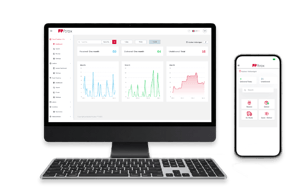
Stop logging parcels in sheets.
Understand FP Trax in less than 30 minutes.
Parcel tracking software for hospitals, universities, corporate offices and large organisations
The challenge of inbound parcel management at scale is not the individual parcel. It is the volume. An organisation receiving 300 parcels a day cannot rely on a manual process to track, notify and confirm delivery for each one without errors, delays and regular searches for packages that have no record attached. FP Trax automates every step from arrival to handover, at any volume, without requiring a change in the hardware your team already uses.
The scan at arrival takes three seconds. The notification goes out automatically using the recipient data already in your Azure Active Directory or HR system. No one enters recipient details manually. No one looks up email addresses. FP Trax does it from the directory sync and the notification is sent before the parcel leaves the receiving area.
Proof of delivery is a specific operational requirement for many organisations, particularly in regulated industries such as healthcare, pharmaceuticals and financial services. FP Trax records a digital signature, timestamp and collection location for every handover. The record is permanent, searchable and exportable. If a compliance audit, SLA review or internal dispute requires evidence that a specific parcel was delivered to a specific person on a specific date, FP Trax produces it in seconds.
For organisations running mixed delivery models, FP Trax manages all four without a separate system or workflow for each. Desk deliveries, reception pickups, locker collections and authorized handovers all feed into the same record. The mailroom manager sees a unified view of all parcels regardless of how they were delivered. Volume, status and exception reporting work across all models in the same dashboard.
Setup takes less than 48 hours and requires no hardware investment. FP Trax runs on any existing device: mobile, tablet or desktop. The connection to Azure AD for recipient directory sync is configured during onboarding. Your team logs in with existing credentials. There is no IT project, no infrastructure change and no period where the old system and the new system run in parallel. Day one is live.
FP Trax parcel tracking software is available for organisations handling less than 20 parcels per day, scaling to larger plans for higher volumes. It is used by hospitals, universities, manufacturing sites, corporate offices and government facilities across Europe. All plans include automatic recipient notifications, digital proof of delivery, Azure AD sync and full audit trail export. Smart locker integration, letter tracking, asset management and inventory management are available as optional modules on any plan.
SERVICE VIDEO
Showcase your awesome service with quality video content.
Lorem ipsum dolor sit amet, consetetur sadipscing elitr, sed diam nonumy
27K | 1.2MIO |
| Lorem ipsum dolor sit amet, consetetur sadipscing elitr, sed diam sit amet, consetetur elitr. | Lorem ipsum dolor sit amet, consetetur sadipscing elitr, sed diam sit amet, consetetur elitr. |