Skip to content
unidelivery1

University & Education

Every department delivery tracked. Every asset accounted for.

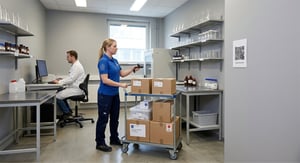
Your campus receives lab equipment, IT hardware, research materials and faculty mail every day across multiple buildings. FP Trax scans each delivery on arrival, routes it to the right department and notifies the recipient instantly.

Nothing gets lost between the loading dock and the lab.

Potential issue: A research shipment arrives at reception. Nobody is sure which department ordered it. Three days later it is still there.

IT hardware gets signed for by whoever happens to be at the desk. Six weeks later, no one can account for where it went.

FP Trax scans every delivery on arrival, identifies the recipient and routes it to the right department automatically. The notification is sent before the item leaves the mailroom.

Every handover is logged with a timestamp and a digital signature. Every asset is traceable from the loading dock to the desk.

What FP Trax does at universities and schools

  • Every delivery arrives at the right building and department – always
  • IT assets tracked end‑to‑end with full custody transparency
  • All campus sites managed from one unified dashboard
  • Handles seasonal peaks without changing processes
  • Smart‑locker pickup 24/7 — no reception queues
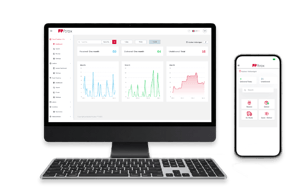
trax-comp-mob

Track your assets - Try 30 days for free

Create account. → Download the mobile app. → Track of what is important to you.

Try 30 days, no credit card or strings attached.

How FP Trax is used at Universities

Handle parcels or letters

The campus logistics team scans all incoming parcels and letters using FP Trax on any device, even offline. FP Trax records the carrier, item type, recipient, and timestamp. The recipient is notified instantly. Every item has a digital record from the moment it arrives on campus.

Recipients collect and sign

Recipients collect their parcels at the service desk, direct delivery or via a smart locker. FP Trax captures their signature and logs the handover. Can also be integrated to smart lockers ensure smooth and secure collection without requiring additional staff.

Audit report exported

Departments and faculties can export a full delivery SLA/audit report with just a few clicks. They can see delivery volumes, handling times, collection rates, and other metrics in real time. No manual reporting. No phone calls. No searching for lost parcels.

Asset management service
FP Trax handles campus assets such as lab equipment, car keys, e‑bikes, measuring tools, AV equipment, or shared research instruments. Borrowers sign digitally, and automatic reminders are sent when items are overdue. No more misplaced equipment, and full transparency over usage.
Inventory

Track gas cylinders, dry ice, IT accessories or everyday consumables in real time. FP Trax logs who collected what — and from which institution — creating an instant basis for internal billing and avoiding duplicate orders.

Custom workflows

FP Trax is customised and configured with delivery categories, escalation contacts, laboratory or campus service rules, and SLA thresholds. Staff authenticate using the university’s existing credentials — no extra passwords, no IT project required. New campus buildings or labs can be operational within minutes.

How parcel tracking can be handled

There are many different ways of how parcels and assets can be handled with FP Trax.
FP Trax works with every delivery model your mailroom uses. Each one logs the handover automatically.
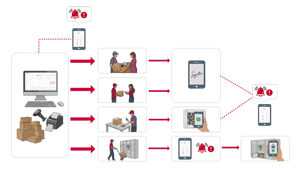
traxflow-01
Collect at reception

Recipient receives a notification with sender, reference and collection point. They walk to reception, confirm identity and sign on screen. Signature, time and name stored automatically. The most common model for office and campus environments.


Delivery to desk

The parcel is assigned to a delivery run in FP Trax. Mailroom staff delivers to the recipient's floor or office. The recipient signs on the operator's device at handover. Collection point and timestamp recorded without the recipient visiting reception.


Smart locker collection

Parcel placed in a locker. FP Trax sends the recipient their personal code. They collect at any time without reception needing to be staffed. Collection logged the moment the door opens. Works 24 hours a day.

Personal delivery
The parcel is intended for a specific employee. Internal mail scans the parcel, delivers it directly to the employee, and the employee signs for the delivery digitally on a tablet or smartphone.
Delivered to a room
The parcel is a stock-up delivery intended for a storage room. Internal mail scans the parcel and the room’s QR/barcode, then takes a photo of the parcel placed on the correct shelf.
Authorized colleague pickup

Recipient designates a colleague to collect on their behalf. FP Trax records both names: the original recipient and the person who collected. The audit trail shows the authorization and the handover separately.

1. Incoming parcel

Your receiving team scans the barcode on arrival. FP Trax creates an instant record: carrier name, item description, timestamp and recipient. The scan takes under a second, the record is permanent.

2. Notification

FP Trax sends an automatic notification by email, SMS or Microsoft Teams/Slack. For time-sensitive deliveries, the message goes directly to the department lead. No phone calls. No paper collection slips. 

3. Item delivered

In universities or schools deliveries are often to a specific faculty or room with a location scan.  The system records who collected, when and at which collection point in the building. Chain of custody closed.

4. Full delivery history. Audit ready.

Every delivery across every campus building is logged in FP Trax and searchable by date, recipient, department, carrier or delivery type. Facilities managers see volume and handling time per location.

Built for the complexity of a real campus

Campus operations are not simple. You have multiple buildings, multiple departments and deliveries arriving from dozens of suppliers every week. Lab equipment for the chemistry faculty, medical devices for the student health centre, IT hardware for a department rollout, grant funded instruments for a research team. Each one needs to reach a specific person at a specific location.

FP Trax integrates with your directory, whether that is Azure Active Directory, LDAP or a custom staff database. When a delivery arrives, you can quickly search and assign the parcel using your synced directory—no need to manually type out names, email addresses, or departments  No phone calls to the department. The right person gets the notification and the right building gets the delivery.

For multi campus institutions, every location runs on the same platform. Facilities managers sees volume, handling times and pending collections across every building from a single dashboard. Seasonal surges, such as the start of term or a research grant procurement period, are handled without any process changes.

IT assets deserve their own workflow. When a laptop, monitor or piece of equipment arrives, FP Trax logs the asset reference, assigns it to the recipient and records the department. That record can feed directly into your asset register. From the moment a device arrives on campus to the moment it is allocated to a staff member, every step is documented.

Research equipment and high value instruments follow the same process. The delivery is logged, the researcher is notified and the collection signature is stored permanently. For institutions subject to grant audits or equipment compliance requirements, that record is exactly what auditors ask for.

If your campus has smart lockers, staff and researchers collect at any hour without visiting a staffed reception. The access code arrives in the same notification as the delivery alert.

Ready to stop losing track of things?

bg-video-161758688

SERVICE VIDEO

Showcase your awesome service with quality video content.
Lorem ipsum dolor sit amet, consetetur sadipscing elitr, sed diam nonumy

27K

1.2MIO

Lorem ipsum dolor sit amet,
consetetur sadipscing elitr, sed
diam sit amet, consetetur elitr.
Lorem ipsum dolor sit amet,
consetetur sadipscing elitr, sed
diam sit amet, consetetur elitr.
27001
ISO 9001
14001
team-small-07
Gene CernanAstronaut, Apollo 17
“When you head on out to the Moon, in very short order, and you get a chance to look back at the Earth, that horizon slowly curves around in upon himself, and all of sudden you're looking at something that is very strange, but yet is very, very familiar, because you're beginning to see the Earth evolve.”
team-full-02
Gene CernanAstronaut, Apollo 17
“When you head on out to the Moon, in very short order, and you get a chance to look back at the Earth, that horizon slowly curves around in upon himself, and all of sudden you're looking at something that is very strange, but yet is very, very familiar, because you're beginning to see the Earth evolve.”
team-small-05
Gene CernanAstronaut, Apollo 17
“When you head on out to the Moon, in very short order, and you get a chance to look back at the Earth, that horizon slowly curves around in upon himself, and all of sudden you're looking at something that is very strange, but yet is very, very familiar, because you're beginning to see the Earth evolve.”
team-full-03-1
Gene CernanAstronaut, Apollo 17
“When you head on out to the Moon, in very short order, and you get a chance to look back at the Earth, that horizon slowly curves around in upon himself, and all of sudden you're looking at something that is very strange, but yet is very, very familiar, because you're beginning to see the Earth evolve.”