


Parcel operations rarely follow one fixed pattern. Different teams need different views. A facilities team may focus on incoming parcel volumes. A mailroom manager may want to monitor damaged goods. Operations teams may need a clearer view by carrier, recipient, parcel type or time period.
With the new add-on for Flexible Dashboards in FP Trax, parcel data becomes easier to work with. Users can customize dashboard views, save them for recurring tasks and access the insights that matter most to their daily operations. The feature is available as an add-on to your FP Trax subscription and gives teams more control over how they monitor and report parcel flows.
From standard reporting to flexible parcel insights
Standard dashboards are useful for a quick overview. But in high-volume environments, teams often need more specific answers:
-
Which carriers handle the highest volume?
-
Are there recurring issues with damaged goods?
-
How do parcel volumes develop across a custom time period?
-
Which recipients or departments generate the most activity?
Flexible Dashboards help answer these questions faster. Instead of working with fixed views only, users can configure dashboards around their operational priorities and focus on the information that supports better decisions.
What flexible dashboards make possible
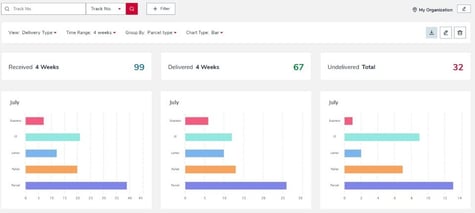
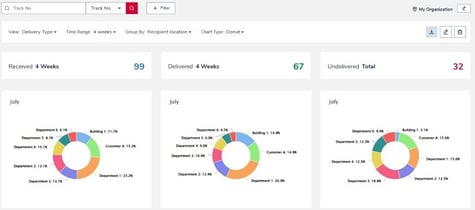
With Flexible Dashboards, users can create and save individual dashboard views in FP Trax. These views can be adapted using relevant filters and settings, including:
-
recipient
-
parcel type
-
carrier
-
damaged goods
-
custom time periods
Saved views can be reused for daily operations, recurring analysis or management reporting. This reduces the need to rebuild the same filters again and again, especially for teams that regularly monitor specific KPIs or operational exceptions.
Charts can also be downloaded as images, making it easier to share insights in internal updates, reports or team meetings.
Better visibility across parcel operations
Parcel tracking is not only about knowing where a shipment is. It is also about understanding how parcel flows move through an organization.
With Flexible Dashboards, teams get a clearer view of incoming and internal parcel activity. Managers identify patterns more easily, monitor operational performance and keep an eye on areas that may require attention, such as damaged goods, carrier performance or recurring volume peaks. This is especially valuable for organizations that handle a high number of parcels, work across several locations or need to document performance against internal service levels.
Key benefits at a glance
Flexible Dashboards support teams with:
-
More transparency: View parcel data by the criteria that matter most to your operation.
-
Faster reporting: Save dashboard views and reuse them for recurring analysis.
-
Custom time periods: Analyze trends, seasonal changes and specific reporting windows.
-
Better exception monitoring: Track damaged goods, carrier patterns and recipient-specific activity more easily.
-
Actionable KPI insights: Monitor operational performance and support internal SLA compliance.
A new way to work with parcel data in FP Trax
With the new feature for Flexible Dashobards, FP Trax gives teams more freedom in how they analyze parcel operations. Instead of adapting your reporting to fixed dashboard views, you can shape your dashboard around the way your organization works.